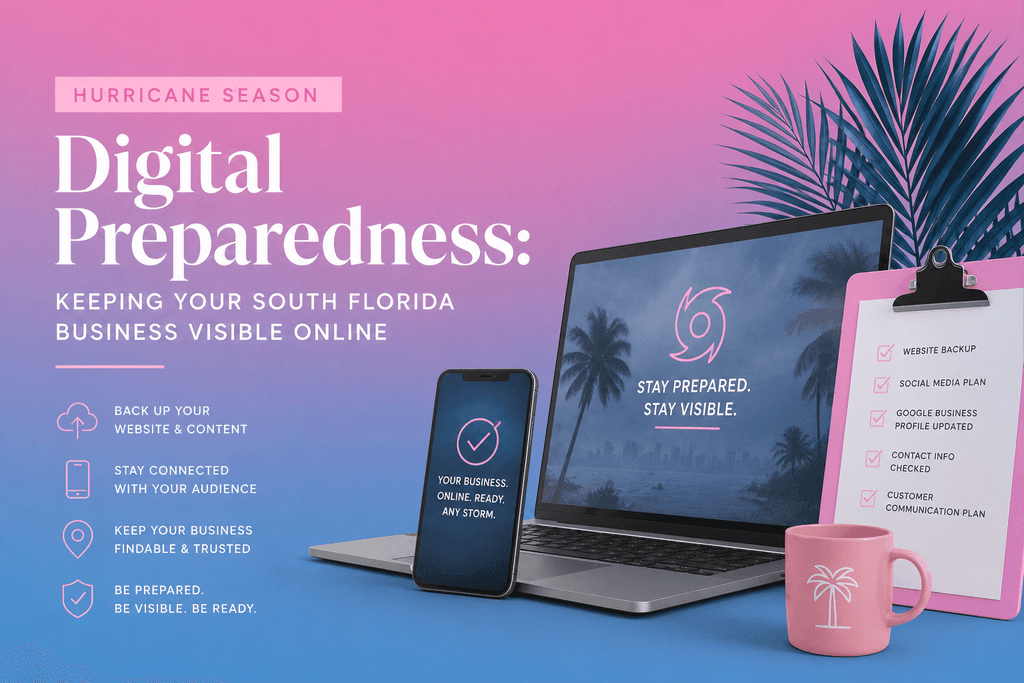
Hurricane Season Digital Preparedness: Keeping Your South Florida Business Visible Online
Logo/Branding
8
min read
June 1st arrives every year with the same quiet urgency.
South Florida businesses stock up on supplies, board up windows, and update their emergency plans. Generators get tested. Insurance gets reviewed. Staff contingencies get mapped out.
And then almost everyone forgets about their digital presence entirely. That's a mistake that costs South Florida businesses leads, revenue, and Google rankings every single storm season.
According to FEMA, roughly 40% of small businesses never reopen after a major disaster, and another 25% fail within one year. The businesses that bounce back fastest aren't just the ones with the best physical preparations. They're the ones whose digital presence stayed intact, kept communicating, and kept generating leads — even during and after the storm.
This is your complete guide to hurricane season digital preparedness for South Florida service businesses. The goal is simple: when your competitors go dark during a storm event, your business stays visible, stays trusted, and stays in front of the customers who need you most.
Why Your Digital Presence Is a Business Continuity Asset
Most South Florida business owners think about hurricane preparedness in physical terms — the building, the equipment, the inventory. Digital assets rarely make the list.
But in 2026, your website, your Google Business Profile, and your online presence are as much a part of your business infrastructure as your tools and your truck. When they go down or go dark during hurricane season, the damage isn't just lost visibility — it's lost trust.
Think about what happens in the days before and after a major storm in South Florida:
Homeowners are searching for emergency contractors, roofers, plumbers, and restoration companies
Business owners are looking for services to get their operations back online
Families are searching for local businesses to understand who's open and who can help
Search volume for home services in South Florida spikes dramatically in the 48 hours before a storm and the 72 hours after. The businesses that show up in those searches — with accurate information, active Google Business Profiles, and websites that load — capture an enormous amount of emergency business.
The businesses that don't show up lose that business permanently. Those customers find someone else. And they don't come back.
The 2025 storm season reminder: Hurricanes Helene and Milton made landfall in Florida within two weeks of each other in 2024. The 2025 storms showed again how quickly systems can go offline — and how businesses with solid continuity plans bounced back fastest. Don't wait for a named storm to start preparing. |
Step 1: Back Up Your Website Before June 1st
Your website is a business asset. Treat it like one.
Businesses should confirm that backups are complete, secure, recent, and recoverable — not just that they exist. A backup that can't be restored is the same as no backup at all.
For South Florida service businesses specifically, here's what website backup preparedness looks like:
☑ Website Backup Checklist |
☐ Automated daily backups are enabled on your website |
☐ Backups are stored off-site or in the cloud — not just on your local server or host |
☐ You've tested restoring from backup at least once in the last 6 months |
☐ You know who to call if your site goes down and you need it restored quickly |
☐ Your domain registration is paid up and won't expire during storm season |
☐ Your hosting is on a reliable provider with redundant infrastructure — not budget shared hosting |
If you built your site on Framer, Webflow, or a similar platform — these providers typically handle infrastructure redundancy on your behalf. But your content — every page, every blog post, every service description — should still be backed up independently. Don't assume your platform is doing it automatically without checking.
Step 2: Update Your Google Business Profile Before the Season Starts
Your Google Business Profile is often the first place customers look during a storm event. Is your business open? Are you taking emergency calls? Do you serve their area?
If your GBP is outdated, incomplete, or inactive — you're invisible to the people who need you most at the highest-demand moment of the year.
☑ Pre-Season GBP Update Checklist |
☐ Business hours are accurate and current |
☐ Phone number is correct and actively monitored during storm season |
☐ Service area reflects every city you currently serve |
☐ A Google Post is published before June 1st confirming you're open for storm season |
☐ Emergency or after-hours contact information is in your business description |
☐ Photos are current and include recent work — before/after storm damage repairs if applicable |
☐ Q&A section answers 'Do you offer emergency services?' and 'What areas do you serve after a storm?' |
During an active storm event, Google lets businesses mark temporary closures or special hours directly in the GBP dashboard. Use this. A business that says 'Temporarily Closed — Reopening 6/15' is more trustworthy than one that says nothing. Customers respect honesty. They don't respect silence. Our full Google Business Profile optimization guide covers every field you need to have complete before the season starts.
Step 3: Create a Storm Season Landing Page
This is the move almost no South Florida business makes — and the one that can generate the most storm-season leads.
A dedicated landing page on your website targeting hurricane season search traffic puts you directly in front of customers searching for emergency services during and after a storm. Think about what people are typing into Google after a major storm hits South Florida:
'emergency roof repair miami after hurricane'
'water damage restoration fort lauderdale storm'
'emergency plumber coral springs flooding'
'tree removal service broward county storm damage'
'generator repair south florida hurricane'
Every one of those is a high-intent, high-urgency search. A landing page built around your storm-season services — with those keywords, your service area, your emergency contact number, and clear availability information — can rank for those searches and capture leads that your competitors are completely missing.
What your storm season page should include:
|
Build this page before storm season starts — not during it. Google needs time to index and rank new pages. A page published in May will be indexing by July. A page published during a storm in September helps nobody.
Step 4: Prepare Your Communication Plan
When a storm is bearing down on South Florida, communication becomes your competitive advantage. The businesses that communicate clearly and proactively before, during, and after a storm build enormous trust — the kind that turns one-time emergency customers into long-term clients.
Before the Storm
Publish a Google Post letting customers know your status — are you still taking calls? Are you boarding up and closing? Are you in emergency-response mode? Post this 24–48 hours before projected landfall.
Update your GBP hours immediately. Set a temporary closure if needed. Add a special hours note for emergency availability.
If you have an email list or text subscriber base — send a message. Something simple: 'We're monitoring the storm and will resume service as soon as it's safe. For emergencies, call [number].'
After the Storm
This is where the real opportunity is. The 72 hours after a storm makes landfall in South Florida are the highest-demand period for home services, restoration, and emergency contractors in the entire year.
Within 24 hours of the storm passing, publish a Google Post confirming you're open and taking service calls. Update your GBP hours. Post on social media. If you have a blog, publish a quick update — 'We're Back: [Business Name] Is Serving [Cities] After the Storm.'
Businesses that survive hurricanes most effectively are rarely the ones with the cheapest IT or the biggest marketing budgets. They're the ones with mature continuity strategies who outperform competitors still trying to figure out what went wrong. Being the first business back online and communicating clearly puts you miles ahead of competitors who go silent.
Step 5: Seasonal SEO — Owning the Storm Season Search Landscape
Hurricane season runs June 1 through November 30. That's six months of elevated search volume for storm-related services across South Florida. Most businesses do nothing with this.
Here's what a proactive seasonal SEO strategy looks like:
Publish Storm-Season Content Before June
Blog posts targeting hurricane season searches should be published in April and May — giving Google 4–6 weeks to index and rank them before the high-traffic season begins. Topics that work well for South Florida service businesses:
For roofers: 'How to Prepare Your South Florida Roof for Hurricane Season,' 'Signs Your Roof Won't Survive a Category 3 Storm'
For plumbers: 'What to Do When Your Home Floods After a Storm,' 'How to Shut Off Your Water Before a Hurricane'
For contractors: 'Hurricane-Proofing Your South Florida Home: A Room-by-Room Guide'
For web designers: 'Is Your South Florida Business Website Ready for Hurricane Season?' (That's this post.)
Each of these targets a specific, seasonally-relevant search with real intent behind it. They generate traffic during the peak season, and they build your authority as a local expert year-round.
Update Your Location Pages for Storm Season
If you have location-specific pages for Miami, Fort Lauderdale, Coral Springs, and other South Florida cities — add a seasonal section to each one. Something as simple as 'Serving [City] Before, During, and After Hurricane Season' with relevant content about your storm-related services.
This tells Google your pages are actively maintained, adds fresh content to pages that may have gone stale, and captures storm-season search traffic on pages that are already indexed and ranking.
Step 6: Protect Your Hosting and Domain — The Basics Nobody Checks
Every June, South Florida businesses brace for hurricane season — and one extended outage or data loss event can cripple operations. Before storm season starts, run through this infrastructure checklist:
☑ Hosting and Domain Checklist |
☐ Domain registration renewal date checked — will it expire between June and November? |
☐ Hosting provider uses redundant infrastructure and cloud-based servers |
☐ You have login access to your hosting account and domain registrar |
☐ Website uptime monitoring is active — you'll know within minutes if your site goes down |
☐ Your hosting provider's support contact is saved somewhere accessible |
☐ SSL certificate is valid and won't expire during storm season |
☐ Website files are backed up and accessible from a non-local location |
☐ Your website can be managed remotely if you need to evacuate |
That last point matters more than most people realize. If a major storm forces evacuation and you need to update your website or Google Business Profile from a hotel in Orlando — you need remote access. Make sure your login credentials are saved somewhere accessible that isn't your office computer.
The Full Hurricane Season Digital Preparedness Timeline
Your Pre-Season Timeline April: Publish storm-season blog content so Google has time to index it before June May: Build your storm season landing page and update location pages with seasonal content June 1: Confirm website backups, check domain expiration, verify hosting reliability, update GBP hours and publish your season-opening Google Post During storm season: Monitor GBP for accuracy, respond to reviews promptly, publish weekly Google Posts to signal activity Before named storm (48 hrs): Update GBP status, post on social, email or text your customer list After storm passes (24 hrs): Publish Google Post confirming availability, update GBP hours, post on social, publish a quick blog update November 30: Update seasonal content, archive storm pages, and start planning next year's strategy |
South Florida's Best-Kept Competitive Advantage
Here's the reality of hurricane season in this market: most of your competitors go dark. They don't update their GBP. They don't publish storm-season content. They don't communicate with customers before or after a storm. They just wait for it to pass and hope their phone rings.
That's your opportunity.
The businesses that communicate clearly, stay visible on Google, and actively capture storm-season search traffic aren't just getting through hurricane season — they're pulling ahead of competitors who treat it as something to survive rather than something to leverage.
This is the same principle behind everything we've been building in this blog series — from getting your South Florida business to show up on Google to understanding how Google's AI is changing local search. The businesses that win in South Florida are the ones that treat their digital presence as an active, living asset — not a set-it-and-forget-it checkbox.
Hurricane season is six months long. Start preparing for it like the business opportunity it actually is.
Want help building a hurricane-season digital strategy for your South Florida business? From storm season landing pages to GBP management to website backup planning — we've got you. Let's work. |